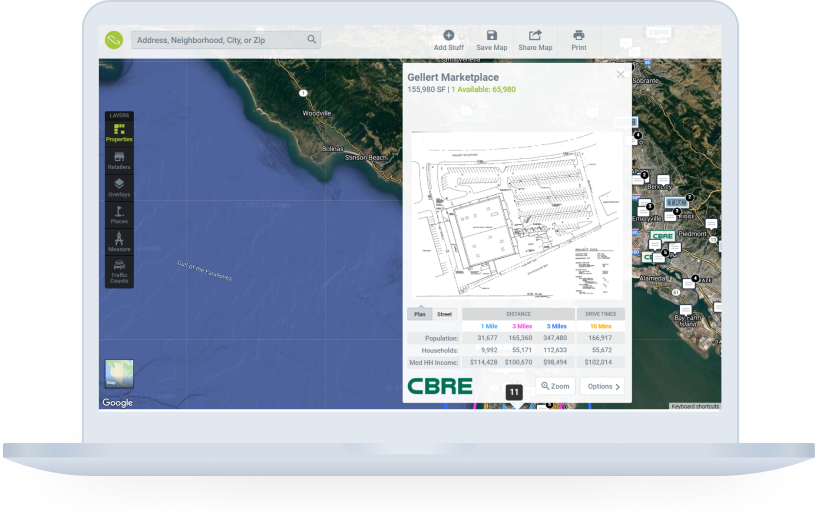
Ajackus built an embeddable Google Maps application for Property Capsule that visualises complex commercial property data across any platform—with a custom spiral algorithm that solves data overlap at any zoom level.

Engagement Model
Team Augmentation
Your team, supercharged — every Ajackus engineer comes AI-native, shipping 40–60% faster from day one
Managed Delivery
Tell us the problem. We handle everything — discovery, architecture, build, testing, deployment — at AI speed
BOT Model
We build your offshore engineering center with AI-trained teams, operate it to maturity, then transfer ownership to you
Expertise
AI Development
Custom AI agents, LLM integrations, RAG pipelines, and AI enablement — from strategy to production
Web Development
Enterprise web applications built with AI-augmented engineering for 40-60% faster delivery
Mobile Development
Native and cross-platform mobile apps built at AI pace with rigorous automated quality
DevOps
Infrastructure that scales automatically, deploys safely, and costs less
Low-Code/No-Code
Airtable, Glide, Shopify, and WordPress solutions with AI automation layers — built in days
Data Analytics
Turn raw data into decisions that drive revenue — 80% faster with AI-assisted analytics
UI/UX Design
User-centered interfaces designed with AI-powered speed — 3x faster iteration, sharper insights


How Property Capsule Delivered Embeddable, Personalised Map Solutions for Commercial Property Visualisation
Services
Web Development
UI/UX Design
Technologies



Framework-Free
Lightweight Embed
Spiral
Clutter-Free Algorithm
1 iFrame
Embed Anywhere
Overview
Executive Summary
Client Overview
The Challenge
Project Goals
Our Approach
Results and Impact
Frequently Asked Questions
Executive Summary
The Problem
Property Capsule needed a tailored map solution built on Google Maps to visualise commercial property data—including overviews, agent contacts, site plans, tenant lists, and demographics. The solution had to be embeddable across iPads, mobiles, laptops, and any website, while handling the complexity of displaying numerous nearby retailers without visual clutter.
The Solution
Ajackus built a lightweight embeddable map application (deliberately framework-free for performance), a parent Angular app with authentication and premium features, and a custom spiral algorithm that strategically distributes overlapping data points from the centre outward—ensuring clutter-free display at every zoom level.
The Result
Property Capsule now offers custom, responsive maps embeddable on any device and website via a single iFrame code snippet. The spiral algorithm ensures optimal performance even at maximum data density, and the parent app delivers secure user management with collaborative sharing features.
Client Overview
Property Capsule streamlines property portfolio management through a cloud-based platform, simplifying centralisation, automation, and publication of crucial property data. The platform’s presentation modules are available across iPads, mobiles, and laptops, serving commercial real estate professionals who need to visualise and share property information across multiple channels.
| Industry | Commercial Real Estate (PropTech) |
| Platform Type | Cloud-based property management |
| Key Deliverable | Embeddable Google Maps application |
| Technologies | Angular, PHP, MySQL, Google Maps API |
The Challenge
THE BOTTOM LINE
Property Capsule needed a customised, embeddable map solution that could visualise complex commercial property data on Google Maps across any platform—while solving the technical challenge of displaying numerous nearby retailers without overlap.
Property Capsule required a map solution that went far beyond standard Google Maps functionality, with specific technical requirements around embeddability, data density, and cross-platform consistency.
Core Pain Points
- Customised map solution needed: A tailored solution atop Google Maps was required to effectively visualise diverse commercial property data across the entire portfolio.
- Cross-platform embeddability: The map needed to integrate seamlessly across iPads, mobiles, laptops, and any third-party website—requiring a consistent, lightweight approach.
- Data visualisation complexity: Displaying diverse information (overviews, contacts, site plans, tenant lists, photography, demographics) on a single map interface was technically challenging.
- Data overlap at scale: Numerous nearby retailers created visual clutter on the map, especially at lower zoom levels—requiring a custom algorithmic solution rather than a design workaround.
- User-friendly web updates: Property Capsule needed a web interface allowing users to effortlessly update property details without technical knowledge.
Project Goals
The project aimed to deliver a high-performance, embeddable map solution that could handle the complexity of commercial property data while being lightweight enough to embed anywhere without impacting host page performance.
| Goal | Success Criteria |
|---|---|
| Build embeddable map app | Works on any website supporting iFrame with a simple code snippet |
| Google Maps integration | Markers, polygons, lines for comprehensive property visualisation |
| Lightweight architecture | No JS framework for embed—minimal footprint, maximum performance |
| Solve data overlap | Custom algorithm for clutter-free display at all zoom levels |
| Parent app with authentication | User registration, auth, and premium sharing features |
| Cross-device responsive | Maps fit any screen size seamlessly |
Our Approach
Ajackus took a performance-first approach, deliberately choosing architectural constraints that prioritised embeddability and load speed over developer convenience.
Embeddable App with Google Maps API
The team built the embeddable application using Google Maps API with markers, polygons, and lines for property data visualisation. Robust integration with data points enabled the display of property data in embed mode, delivering a consistent user experience across any web or mobile application.
Lightweight, Framework-Free Embed
The team deliberately chose not to use any JavaScript framework for the embeddable app, keeping it extremely lightweight. While this created state management challenges, it aligned with the priority of maintaining a minimal-footprint application that could be embedded anywhere without affecting host page load times.
Angular Parent Application
The parent application was built in Angular, leveraging its extensive community support and streamlined build process via Angular CLI. This included robust user registration and authentication, plus premium features like collaborative sharing to enhance user engagement.
Custom Spiral Algorithm
The standout technical achievement was implementing a custom spiral algorithm to solve the data overlap problem. When numerous nearby retailers are plotted on the map, the algorithm strategically distributes them starting from the central location and spiraling outward to find open positions—ensuring a clutter-free display at multiple zoom levels, even exceeding the capacity of most screens.
Results and Impact
Property Capsule gained a production-ready embeddable map solution that works across any device and platform, with a custom algorithm that solved the data density challenge at its core.
Framework-Free
Zero JS Framework in Embed
Spiral
Custom Overlap Algorithm
1 iFrame
Universal Embed Code
What Was Delivered
- Embeddable map app that works on any device and any website supporting iFrame with a single code snippet.
- Responsive design that fits any screen size seamlessly without manual configuration.
- Custom spiral algorithm ensuring clutter-free data visualisation at every zoom level, even at maximum density.
- Parent Angular app with secure user registration, authentication, and premium collaborative sharing features.
- Lightweight, framework-free embed architecture ensuring zero impact on host page performance.
- Full Google Maps API integration with markers, polygons, and lines for rich property data visualisation.
Why It Worked
Lightweight by Design
Choosing no JS framework for the embed meant minimal footprint and maximum compatibility across any host platform.
Algorithm Over Compromise
Instead of limiting data shown, the spiral algorithm solved overlap at the rendering level—preserving information density.
Embed-First Architecture
Designing for embeddability from day one ensured the map worked consistently across every platform and screen size.
Frequently Asked Questions
How does the Property Capsule map embed on third-party websites?
The map app is embeddable via iFrame with a simple code snippet. The responsive design ensures it fits any screen size, and the lightweight architecture (no JS framework) means it won’t impact host page performance.
How does the spiral algorithm prevent data overlap on maps?
When multiple retailers are plotted near each other, the algorithm distributes them starting from the central location and spiraling outward to find open positions, ensuring a clutter-free display at all zoom levels—even at maximum data density.









Let’s Build your Project Together